> ## Documentation Index
> Fetch the complete documentation index at: https://docs.originhq.com/llms.txt
> Use this file to discover all available pages before exploring further.
# Dashboard: Origin's Built-in Dashboards and Chat Interface
> Out-of-box Origin dashboards for security posture, AI usage, adoption, shadow AI, tools, and token spend, plus a free-form chat interface to query anything in the system.
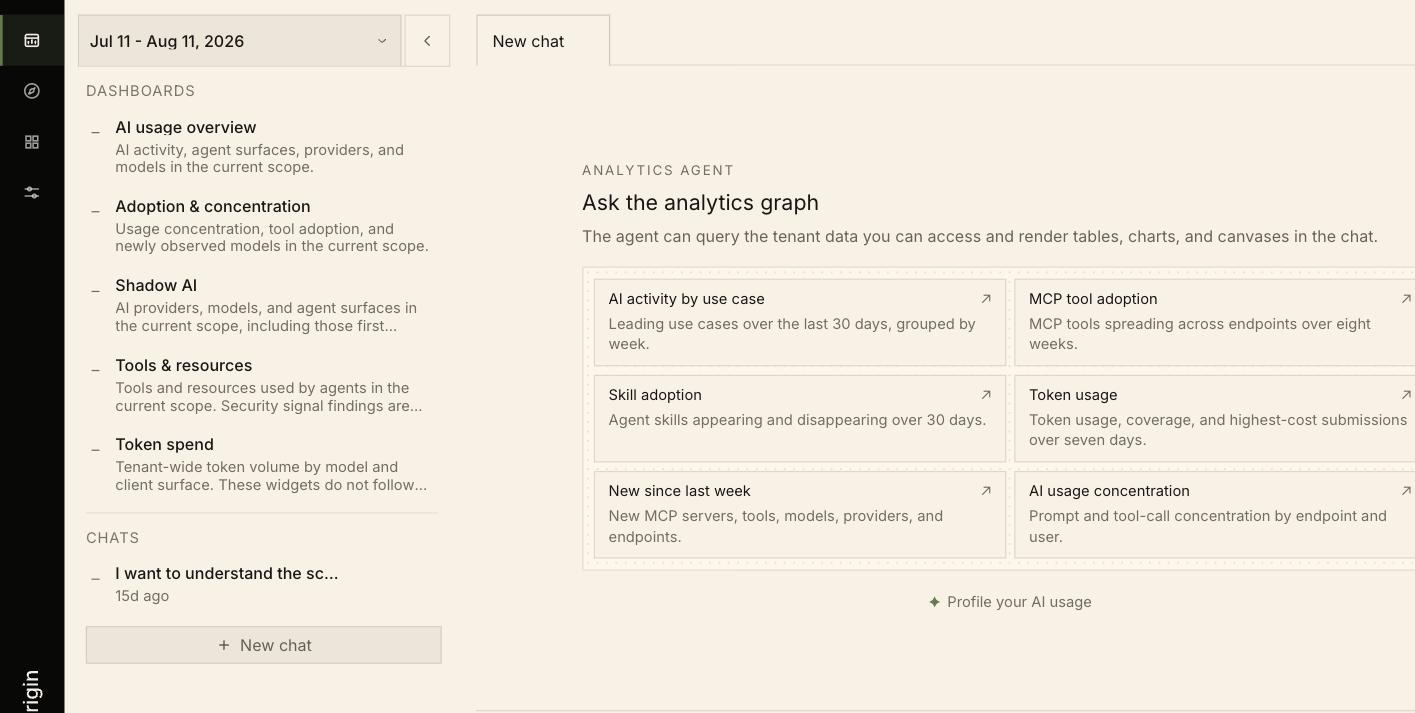
**Dashboard** is the first view in the icon rail — sometimes called the Analytics Graph, after the data model it queries. It has two halves: a set of out-of-box dashboards down the left, and a free-form chat interface that queries your tenant in plain language.
 ## Dashboards
Six dashboards ship with the product, listed at the top of the left panel:
| Dashboard | What it covers |
| ---------------------------- | ---------------------------------------------------------------------------------------------------- |
| **Security posture** | A CISO view of observed AI coverage, exposure, use, governance evidence, and policy enforcement gaps |
| **AI usage overview** | AI activity, agent surfaces, providers, and models in the current scope |
| **Adoption & concentration** | Usage concentration, tool adoption, and newly observed models |
| **Shadow AI** | AI providers, models, and agent surfaces in scope, including first-seen ones |
| **Tools & resources** | Tools and resources used by agents, with security signal findings |
| **Token spend** | Tenant-wide token volume by model and client surface |
Most dashboards follow the current scope. **Token spend does not** — it reports tenant-wide figures and does not narrow when you scope in. For scoped cost, use the **Token volume** series on the Explore activity surface.
Dashboards are canvases. The same object appears as a tab in [Explore](/walkthroughs/explore) rendered against your current scope, and is edited in the [Library](/walkthroughs/library).
## Ask the Analytics Graph
The chat interface queries the tenant data you can access and renders results as tables, charts, and canvases inline.
Access is bound by your role — the agent only reaches data your grants already allow, so two people can legitimately get different answers to the same question. See [Access Control](/product/role-based-access-control).
### Starter prompts
Six starters sit on the empty state, each a real query you can run or edit:
| Starter | What it asks |
| --------------------------- | ------------------------------------------------------------------- |
| **AI activity by use case** | Leading use cases over the last 30 days, grouped by week |
| **MCP tool adoption** | MCP tools spreading across endpoints over eight weeks |
| **Skill adoption** | Agent skills appearing and disappearing over 30 days |
| **Token usage** | Token usage, coverage, and highest-cost submissions over seven days |
| **New since last week** | New MCP servers, tools, models, providers, and endpoints |
| **AI usage concentration** | Prompt and tool-call concentration by endpoint and user |
Notice how specific the starters are — each names a window, a grouping, and often a rendering ("make the cluster cells clickable", "build it as a canvas"). Questions phrased that way produce far better answers than open-ended ones, and you can ask for an interactive result or ask it to persist the answer as a canvas.
**Profile your AI usage** sits below the starters and tailors suggestions to what your organization actually does with AI.
### Chats
Conversations are saved in the **Chats** list with a relative timestamp, so an investigation can be picked up later. **New chat** starts a fresh one, and chats open as tabs so several can run side by side.
## Dashboards
Six dashboards ship with the product, listed at the top of the left panel:
| Dashboard | What it covers |
| ---------------------------- | ---------------------------------------------------------------------------------------------------- |
| **Security posture** | A CISO view of observed AI coverage, exposure, use, governance evidence, and policy enforcement gaps |
| **AI usage overview** | AI activity, agent surfaces, providers, and models in the current scope |
| **Adoption & concentration** | Usage concentration, tool adoption, and newly observed models |
| **Shadow AI** | AI providers, models, and agent surfaces in scope, including first-seen ones |
| **Tools & resources** | Tools and resources used by agents, with security signal findings |
| **Token spend** | Tenant-wide token volume by model and client surface |
Most dashboards follow the current scope. **Token spend does not** — it reports tenant-wide figures and does not narrow when you scope in. For scoped cost, use the **Token volume** series on the Explore activity surface.
Dashboards are canvases. The same object appears as a tab in [Explore](/walkthroughs/explore) rendered against your current scope, and is edited in the [Library](/walkthroughs/library).
## Ask the Analytics Graph
The chat interface queries the tenant data you can access and renders results as tables, charts, and canvases inline.
Access is bound by your role — the agent only reaches data your grants already allow, so two people can legitimately get different answers to the same question. See [Access Control](/product/role-based-access-control).
### Starter prompts
Six starters sit on the empty state, each a real query you can run or edit:
| Starter | What it asks |
| --------------------------- | ------------------------------------------------------------------- |
| **AI activity by use case** | Leading use cases over the last 30 days, grouped by week |
| **MCP tool adoption** | MCP tools spreading across endpoints over eight weeks |
| **Skill adoption** | Agent skills appearing and disappearing over 30 days |
| **Token usage** | Token usage, coverage, and highest-cost submissions over seven days |
| **New since last week** | New MCP servers, tools, models, providers, and endpoints |
| **AI usage concentration** | Prompt and tool-call concentration by endpoint and user |
Notice how specific the starters are — each names a window, a grouping, and often a rendering ("make the cluster cells clickable", "build it as a canvas"). Questions phrased that way produce far better answers than open-ended ones, and you can ask for an interactive result or ask it to persist the answer as a canvas.
**Profile your AI usage** sits below the starters and tailors suggestions to what your organization actually does with AI.
### Chats
Conversations are saved in the **Chats** list with a relative timestamp, so an investigation can be picked up later. **New chat** starts a fresh one, and chats open as tabs so several can run side by side.