> ## Documentation Index
> Fetch the complete documentation index at: https://docs.originhq.com/llms.txt
> Use this file to discover all available pages before exploring further.
# Perplexity API Integration
> Capture Perplexity activity in Origin through Perplexity's Enterprise audit log webhook. Coming soon.
**Coming soon.** The Perplexity webhook integration is not yet available. This page describes the planned setup so you can confirm your Perplexity plan and seat count ahead of time.
Origin connects to Perplexity through Perplexity's Enterprise audit log webhook. Once configured in both Origin and your Perplexity organization, Perplexity pushes activity events to Origin directly, and Origin lands them in the same context graph as everything else it observes.
## What it adds
Perplexity activity pushed by the audit log webhook is attributed to the user who ran it and threaded into the same traces, analytics, and inventory as the rest of your AI activity, so Perplexity usage can be investigated alongside everything else Origin captures.
## How it works
The Perplexity webhook is push-based, not pull-based: Origin issues a unique webhook URL and bearer token for your tenant, and Perplexity uses them to send audit log events to Origin as they happen. There is nothing to export and no schedule to manage on the Origin side.
## Minimum Perplexity plan required
Perplexity's audit log webhook is an Enterprise-tier feature, and it is gated by plan and seat count on Perplexity's side:
| Requirement | Detail |
| ----------- | ----------------------------------------------------------------------------------------------------------------- |
| **Plan** | Perplexity **Enterprise** (Pro or Max) |
| **Seats** | **50+ seats** on Enterprise Pro, **or** at least **one Enterprise Max seat** (Enterprise Max has no seat minimum) |
If your organization has fewer than 50 Enterprise Pro seats, you'll need to upgrade at least one seat to Enterprise Max before Perplexity will expose audit log webhook configuration to your org admins.
## Before you start
Make sure you have the following before beginning setup:
* A **Perplexity Enterprise organization** that meets the plan and seat requirements above.
* A **Perplexity org admin**, who can configure the webhook in Perplexity's organization settings.
* An **Origin tenant admin**, who can generate the webhook URL and bearer token in the Origin console.
## Setup
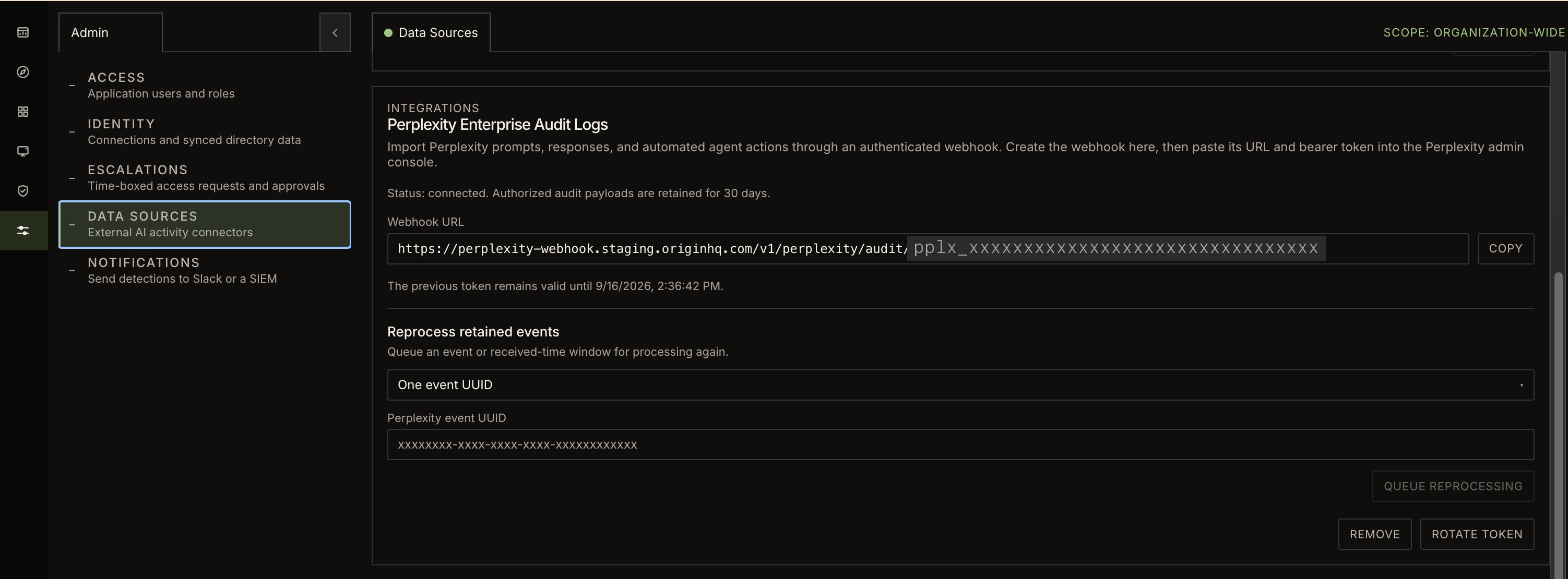
1. Sign in to the Origin console as an admin.
2. Open **Admin → Data Sources**.
3. Find **Perplexity** in the list of data sources.
4. Copy the **webhook URL**.
5. Click **Rotate Token** to generate a bearer token.
6. Copy the token right away and store it somewhere safe — Origin shows it only once, so take a screenshot or otherwise save both values before leaving the page.
Clicking **Rotate Token** again later replaces the token immediately. Any integration still using the old token will stop authenticating, so only rotate it when you're ready to update Perplexity with the new value.
 1. Sign in to [perplexity.ai](https://www.perplexity.ai) as an org admin.
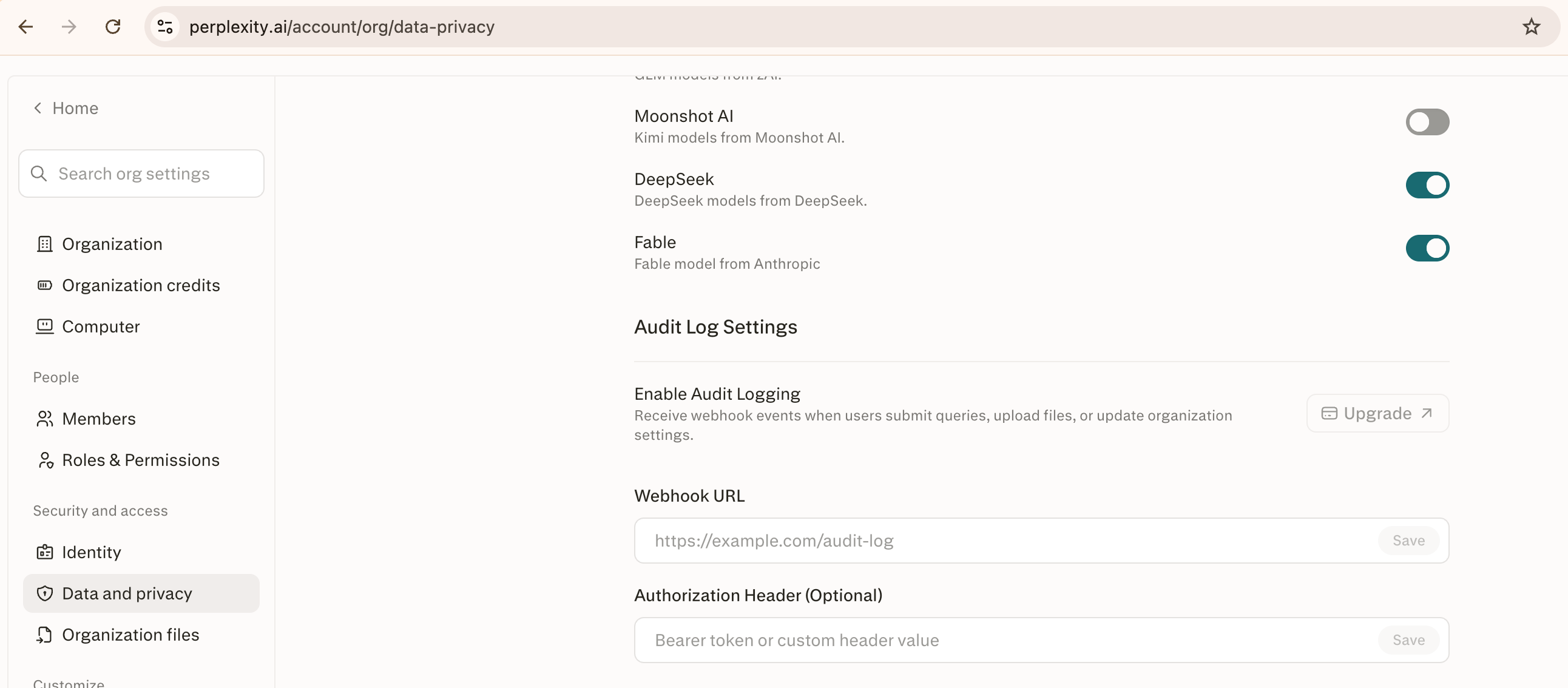
2. Open your organization settings, under **Data and Privacy → Audit Log Settings**.
3. Paste the **webhook URL** and **bearer token** you copied from Origin into the corresponding fields.
4. Save the settings.
1. Sign in to [perplexity.ai](https://www.perplexity.ai) as an org admin.
2. Open your organization settings, under **Data and Privacy → Audit Log Settings**.
3. Paste the **webhook URL** and **bearer token** you copied from Origin into the corresponding fields.
4. Save the settings.
 ## What to expect after connecting
Once both sides are configured, Perplexity audit log events flow into Origin as they happen and appear in your traces, analytics, and inventory alongside the rest of your captured AI activity. No further setup is required.
## Changing or removing the connection
* **Rotate the token:** Click **Rotate Token** again in Origin's **Data Sources** settings, then paste the new token into Perplexity's **Data and Privacy** settings. The old token stops working as soon as you rotate.
* **Disconnect:** Remove the webhook URL and token from Perplexity's **Data and Privacy** settings. New activity stops arriving in Origin; data already captured is unaffected.
## Troubleshooting
| Symptom | Likely cause | Resolution |
| ----------------------------------------------------------- | ------------------------------------------------------------------------- | ------------------------------------------------------------------------------------------------------------------------------ |
| No **Audit Log Settings** or webhook option in Perplexity | Organization doesn't meet the plan/seat requirement | Confirm you have 50+ Enterprise Pro seats, or upgrade at least one seat to Enterprise Max. |
| No Perplexity activity appears in Origin | The webhook URL or bearer token wasn't saved correctly in Perplexity | Re-check **Data and Privacy → Audit Log Settings** in Perplexity and re-paste both values from Origin's **Data Sources** page. |
| Activity stopped arriving after previously working | The token was rotated in Origin but not updated in Perplexity | Copy the current token from Origin's **Data Sources** page and update it in Perplexity's **Data and Privacy** settings. |
| Can't find the Perplexity entry under Data Sources | Your Origin role may not have admin access | Confirm you're signed in as an Origin admin; only admins can view and manage **Admin Settings → Data Sources**. |
| Perplexity Desktop or local usage doesn't show up in Origin | Expected — Perplexity is only captured via the organization-level webhook | There is no endpoint-based capture path for Perplexity; local/desktop usage isn't covered. |
## What Origin accesses
* Origin only **receives** audit log events that Perplexity sends to the webhook — it does not query or pull anything from Perplexity directly.
* The bearer token authenticates incoming requests to Origin's webhook endpoint; it does not grant Origin any access back into your Perplexity organization.
* The token is **shown only once** when generated or rotated, and Origin does not display it again afterward.
This integration is coming soon. Setup steps, required plan, and field names are subject to change before general availability.
## What to expect after connecting
Once both sides are configured, Perplexity audit log events flow into Origin as they happen and appear in your traces, analytics, and inventory alongside the rest of your captured AI activity. No further setup is required.
## Changing or removing the connection
* **Rotate the token:** Click **Rotate Token** again in Origin's **Data Sources** settings, then paste the new token into Perplexity's **Data and Privacy** settings. The old token stops working as soon as you rotate.
* **Disconnect:** Remove the webhook URL and token from Perplexity's **Data and Privacy** settings. New activity stops arriving in Origin; data already captured is unaffected.
## Troubleshooting
| Symptom | Likely cause | Resolution |
| ----------------------------------------------------------- | ------------------------------------------------------------------------- | ------------------------------------------------------------------------------------------------------------------------------ |
| No **Audit Log Settings** or webhook option in Perplexity | Organization doesn't meet the plan/seat requirement | Confirm you have 50+ Enterprise Pro seats, or upgrade at least one seat to Enterprise Max. |
| No Perplexity activity appears in Origin | The webhook URL or bearer token wasn't saved correctly in Perplexity | Re-check **Data and Privacy → Audit Log Settings** in Perplexity and re-paste both values from Origin's **Data Sources** page. |
| Activity stopped arriving after previously working | The token was rotated in Origin but not updated in Perplexity | Copy the current token from Origin's **Data Sources** page and update it in Perplexity's **Data and Privacy** settings. |
| Can't find the Perplexity entry under Data Sources | Your Origin role may not have admin access | Confirm you're signed in as an Origin admin; only admins can view and manage **Admin Settings → Data Sources**. |
| Perplexity Desktop or local usage doesn't show up in Origin | Expected — Perplexity is only captured via the organization-level webhook | There is no endpoint-based capture path for Perplexity; local/desktop usage isn't covered. |
## What Origin accesses
* Origin only **receives** audit log events that Perplexity sends to the webhook — it does not query or pull anything from Perplexity directly.
* The bearer token authenticates incoming requests to Origin's webhook endpoint; it does not grant Origin any access back into your Perplexity organization.
* The token is **shown only once** when generated or rotated, and Origin does not display it again afterward.
This integration is coming soon. Setup steps, required plan, and field names are subject to change before general availability.